
GirlfriendGPT: a library first, a girlfriend second
Some AI girlfriend sites hand you one carefully styled companion. GirlfriendGPT hands you a shelf the length of a corridor, stocked by its own users. I went through it logged out, with no account, no card and no chat, so everything below is what the site shows or says about itself.
A heads-up on the shelf: a big share of the community characters lean on set-ups I won't walk you through, so I've stuck to how the site works. There's plenty of fantasy, workplace and neighbour-next-door material too if that's more your speed.
How you browse the GirlfriendGPT character library
The home page is the library. Two tabs, For you and Explore, sit above filter chips for NSFW, Realistic and All Genders, so realistic characters have a switch and the footer says boyfriends exist too. Below that a Trending Now row of tag chips lets you narrow things down: Scenario, Original Character, Dominant, Submissive, Femdom, Milf, Straight, Bisexual, RPG, Monster Girl, Femboy and more, with a Show all link for the rest.
Each card shows who made it, a content rating (PG or PG-13 on the ones I saw), a blurb and two stat numbers the page doesn't label. Search is the odd one out: a prompt says to sign in to unlock it. Browsing is free, hunting for something specific isn't.
What a GirlfriendGPT character page shows
Open a mild one and you get the creator's name with a Follow button, publish and last-updated times, three unlabeled stats, the blurb and a row of emoji tags covering gender, scenario type, realistic or not, and tone. Buttons say Start New Chat and Generate Pictures, and tabs along the bottom read Reviews, AI Image Generator and Memories.
Creators can leave notes in the blurb, like the one that tells you a scenario plays best in a tamer mode. That's more guidance than most chatbot sites bother with, and there's also a Top Creators leaderboard with Most Engaging, Trending and Most Followers views, though its rows were empty for me.
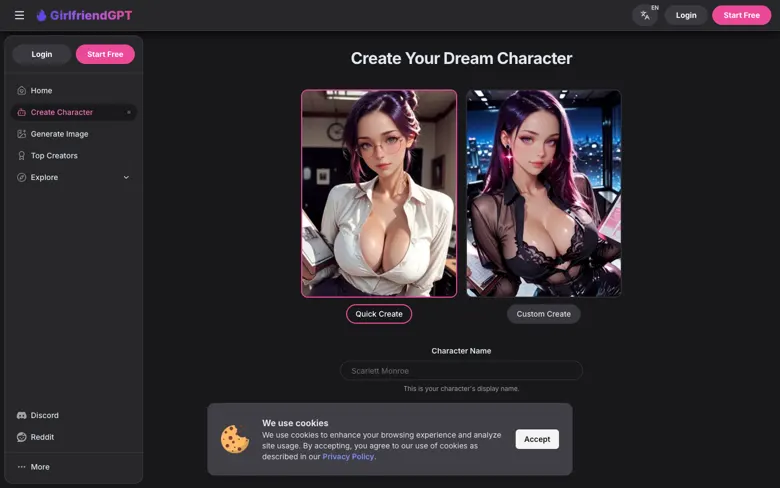
Create Character: Quick Create or Custom Create
The builder opens on Quick Create and Custom Create, with a Character Name box and a Start Creating button. I stopped there. The FAQ says you need an account to make your own partner, and I don't type into forms. The site's own text says you can shape looks, voice and personality, and that you can build from scratch.
The GirlfriendGPT image generator
Generate Image is its own page, not just a button in the chat. It has a prompt box, a negative prompt box, an Auto-Enhance toggle, a Safe Mode toggle and a creativity slider. Styles include Anime, Realistic Pro, Semi-Real, AnimeMix, Comic, Painting, Cartoon and 3D Cartoon, and you pick one, two, four or eight images per go.
A number next to the Generate Image button reads 20 and the page doesn't say what it means. The page also says generated images can be turned into custom videos. I generated nothing, so no verdict on the pictures.
GirlfriendGPT features: what the site says it does
The site says your companion learns from every conversation, can chat by voice and, per the FAQ, can send voice messages. It also advertises AI selfies, a memories tab on character pages, and use from desktop or mobile with no install. Those are the sales lines. How well any of it works is something I can't tell you from outside.
GirlfriendGPT pricing: what the FAQ lists
The pricing page hides behind a sign-in box, so my numbers come from the FAQ. Last time I checked, it listed a Premium plan at $15 a month, Deluxe at $35 and Elite at $50. It doesn't say what separates them, and it sends you to a plans page for the details. The FAQ also mentions a free trial for trying chat and features, with no limits spelled out.
So you can see the ladder but not what's on each rung. Treat the FAQ numbers as a starting point and check the plans page after you sign up.
My verdict
What works: a big, tagged, rated library you can browse for free, character pages that tell you who made what, and a proper image tool on its own page. What doesn't: locked search, plan contents behind a login and a library where I had to skip a lot of themes.
Good for: people who like picking from a user-made scenario library and want chat and images in one place.
Pick something else if: you want a polished single companion, open search before you register, or plan details you can read first.
Visit links go to the official GirlfriendGPT site. Report a problem